
Attendance
See who came to a class and adjust the list. Attendance is separate from anyone’s personal practice log.
Open the list
Section titled “Open the list”- In the bot: send
/classes, or open the shala’s schedule, and tap 📋 Attendance…. Choose the class. - In the app: tap the class on its date in the shala’s schedule.
You can mark a class once it has started, for 7 days.
Mark who came
Section titled “Mark who came”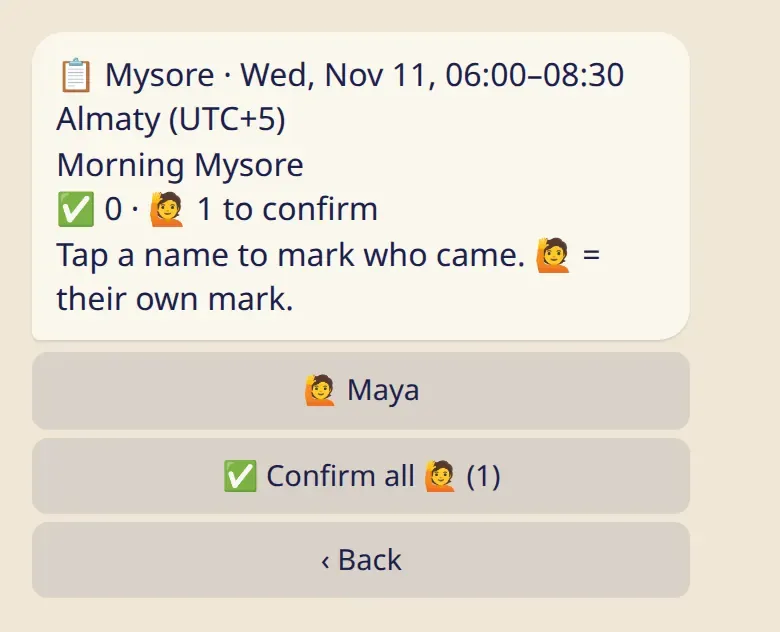
- Tap a name to mark that the person came. Tap again to remove the mark.
- 🙋 next to a name is the student’s own mark. ✅ Confirm all 🙋 (1) confirms all of them at once.
- ✅ is a confirmed mark.
In the app you tick the names, search by name if the list is long, and save.
Who is on the list
Section titled “Who is on the list”The shala’s students, and people on the team who practice there.
What students see
Section titled “What students see”- Their own marks, and nobody else’s. They can remove a mark at any time.
- Nothing ever shows that someone was absent. There is no list of people who didn’t come.
- Nobody gets a message when you mark or confirm.
Good to know
Section titled “Good to know”- Anyone on the team can mark attendance, assistants and the front desk included.
- A cancelled class can’t be marked.
- Attendance is separate from the practice log. Marking a class doesn’t log a practice for the student, and you see nothing from their log here.